snakemake #15
8 changed files with 3838 additions and 2 deletions
1
.gitignore
vendored
1
.gitignore
vendored
|
|
@ -5,3 +5,4 @@ resources
|
|||
.cache
|
||||
.local
|
||||
.npm
|
||||
.idea
|
||||
|
|
|
|||
|
|
@ -30,8 +30,24 @@ hideSummary: false
|
|||
### **Prelude:** Scientist in a data labyrinth
|
||||
As experimental neuroscientist in training, I often find myself caught between two worlds: the messy, exploratory world of data analysis where I try to make sense of the experimental data, often relying on a trial-and-error strategy, and the aspired structured, reproducible world of scientific publication where hopefully every figure will be exactly reproducible. Between these worlds lies a labyrinth of processing pipelines, half-written scripts, and the ever-present risk of breaking the working analysis while trying to improve it. The wandering in the labyrinth is rarely straight-forward -- one is expected to hit many dead ends and discover other interesting distractions before finding the actual treasure -- the key results that hopefully lead to a scientific publication or other forms of consolidated knowledge piece. I try to illustrate this metaphoric labyrinth that is my non-metaphoric reality in a diagram:
|
||||
|
||||
[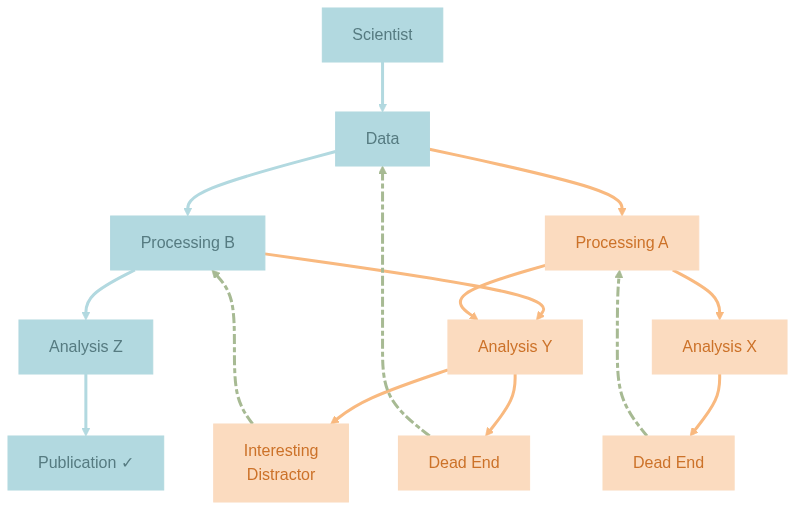](https://mermaid.live/edit#pako:eNqFlMGOmzAQhl_F8mpvkxTbEAKqVmJLDjlUipRWapfswYBJ0BKIjFE3jfIUvfbp-iR1MCQkW205MZ6Zb37PwBxwUqUC-3gt-W6DvoSrEulnGS2TXJQqr9UzGo0eUBiFXPFn4w3bowWNFrJKRF3n5Ro9dr4FbZ0BjYKSF_s6r9H3zhUY13IezUslpKiVTvwYyw8Poa4jeaIq2YUu52g0bmtcU9mF-tRTmVHz9TFaNHGRJ1zlVYn-_P7VBVxpJkPNQa-ZGDq50L_1dOMKZyQKBU_RrEz7JsxIp5FcU-jVbcMZfZtJTWZo5JnT-3u0VPtC6-rtpOB1HYoM1U1ykrzgaoOyvCj8O-7G3GOgu1a9iLOZVEUl_bssTuM4M5R3GDFNPWGdGZ3ZMZyJG0_JGyVlJbe8GEAyL_bc7AzpzH9A3kG0ci8IY3aIJHEp9YaD7NSgJYSwIBAQ0JOAU08v5EFJE0chYKA_kWEbhkEGFNCeBfoDHOJMrB7Oy2lGAllAwIEJummeMUc_8lRtfLZ7vU2jwMCFKXhACBCKbtr2v3QbiC7M0M3Yb9OgCxilvN5wKfneJxZiyEEMg_7R8xT7GS9qAXgr9B1PNj6ciq2w2oitWGFfv6Yi402hVnhVHnXejpdPVbXFvpKNzpRVs96cOc0u5UqEOddrZHs-laJMhfxUNaXCvs1c0lKwf8Cv2iZjanuUEtdh3sSaTADv9anNxq4zpa41tSeEWvYR8M-2rDX2CHWIRRl1pjadMsAizfXK-GwWWLvHjn8BN-hyRQ)
|
||||
|
||||
```mermaid
|
||||
graph TD
|
||||
S[Scientist] --> D[Data]
|
||||
D --> P2[Process B]
|
||||
P2 --> A2[Analysis Y]
|
||||
A2 --> SI[Interesting<br/>Distractor]
|
||||
SI -.-> P2
|
||||
P2 --> A3[Analysis Z]
|
||||
A3 --> PUB[Publication ✓]
|
||||
|
||||
D --> P1[Process A]
|
||||
P1 --> A1[Analysis X]
|
||||
A1 --> DE1[Dead End]
|
||||
DE1 -.-> P1
|
||||
P1 --> A2
|
||||
A2 --> DE2[Dead End]
|
||||
DE2 -.-> D
|
||||
```
|
||||
So how do I navigate this mess? Ideally, I can (1) keep track of all my all tiny and big successes and failures, (2) do so without blowing up the project with unnecessary redundancy, (3) reuse or combine elements of (pre-)processing and analysis in different ways, (4) and (re-)visit and abandon or recover any state at any given time. In short, I want to experiment freely and safely in the space that is spanned by the data and the available (meaningful) manipulations without compromising reproducibility or creating unnecessary overheads.
|
||||
|
||||
### **Introduction:** Better modular than regular
|
||||
|
|
|
|||
BIN
content/posts/snakemake-datalad-worktree/cover.webp
Normal file
BIN
content/posts/snakemake-datalad-worktree/cover.webp
Normal file

Binary file not shown.
|
After Width: | Height: | Size: 124 KiB |
491
content/posts/snakemake-datalad-worktree/index.md
Normal file
491
content/posts/snakemake-datalad-worktree/index.md
Normal file
|
|
@ -0,0 +1,491 @@
|
|||
---
|
||||
title: "Snakemake + DataLad + Worktrees: Automated Pipelines with Provenance Tracking"
|
||||
date: 2026-04-18T12:00:00+02:00
|
||||
author:
|
||||
- Jiameng Wu
|
||||
tags:
|
||||
- DataLad
|
||||
- Snakemake
|
||||
- git-worktree
|
||||
- YODA
|
||||
- Workflow
|
||||
- data-analysis
|
||||
cover:
|
||||
image: cover.webp
|
||||
alt:
|
||||
relative: true
|
||||
description: >
|
||||
Replacing hand-written batch scripts with Snakemake while keeping
|
||||
DataLad provenance tracking and git worktree isolation.
|
||||
The next step in the worktree workflow — with some sharp edges.
|
||||
showToc: true
|
||||
hidemeta: false
|
||||
disableHLJS: true
|
||||
disableShare: false
|
||||
hideSummary: false
|
||||
---
|
||||
|
||||
## Previously on git worktrees...
|
||||
|
||||
In the [previous post]({{< ref "/posts/git-worktree-workflow" >}}), I introduced a workflow for
|
||||
running [`datalad run`](https://docs.datalad.org/en/stable/generated/man/datalad-run.html) commands
|
||||
in a dedicated git worktree in a different branch while continuing development in the main worktree.
|
||||
The batch-processing script was a plain bash loop — it got the job done, but it had no notion of
|
||||
what had already run, what was stale, or what depended on what. If the script failed half-way, a
|
||||
rerun after the fix would either rerun everything again that did not fail, or require me to manually
|
||||
comment out jobs. It also only ran one procedure for multiple subjects, but not all procedures for
|
||||
one subject.
|
||||
|
||||
The natural next step: replace that bash loop with a proper workflow management system. Enter
|
||||
[Snakemake](https://snakemake.readthedocs.io/).
|
||||
|
||||
## Why Snakemake?
|
||||
|
||||
There are [many workflow management systems](https://en.wikipedia.org/wiki/Scientific_workflow_system) out
|
||||
there. You might already know [GNU Make](https://www.gnu.org/software/make/) — the original build
|
||||
tool that checks file timestamps and only rebuilds what's out of date. Snakemake is Make's spiritual
|
||||
successor (the name is literally "Snake (Python) + Make"), but designed for data pipelines instead
|
||||
of C compilers. Like Make, it builds a directed acyclic graph (DAG) of rules, figures out what's
|
||||
missing or outdated, and only runs what it needs to. Unlike Make, it's pure Python —
|
||||
`pip install snakemake`, write a `Snakefile`, done. No extra infrastructure, same ecosystem as
|
||||
DataLad.
|
||||
|
||||
What makes it a natural fit for DataLad is that both tools share the same mental model: **files in,
|
||||
shell command, files out.** A Snakemake rule declares `input:`, `output:`, and `shell:`. A
|
||||
`datalad run` call takes `-i/--input`, `-o/--output`, and a shell command. Both even use placeholder
|
||||
expansion — DataLad's `{inputs}` and `{outputs}` resolve at run-time to whatever you specified with
|
||||
`-i` and `-o`, while Snakemake's arbitrary [**wildcards**](https://snakemake.readthedocs.io/en/stable/snakefiles/rules.html#wildcards)
|
||||
like `{subject}` and `{experiment}` fan out one rule
|
||||
across every parameter combination automatically. Where Make would need you to spell out every
|
||||
target by hand (or write gnarly macro expansions), Snakemake generates N jobs from a single rule
|
||||
definition, each becoming its own `datalad run` invocation with its own provenance record. Very handy!
|
||||
|
||||
The result: a Snakemake rule wraps a `datalad run` call without any glue code, adapters, or plugins
|
||||
— Snakemake handles the orchestration, DataLad handles the provenance. Shared mental model,
|
||||
distributed tasks.
|
||||
|
||||
Together, this gives me:
|
||||
|
||||
- **Automatic chaining** — Snakemake resolves the dependency graph, so I don't need to manually
|
||||
sequence steps (or to remember which steps need a rerun for which subjects and why ... seriously, how do
|
||||
people do it?)
|
||||
- **Incremental execution** — only stale or missing outputs get recomputed
|
||||
- **Provenance** — every step is a `datalad run` commit with full input -> output tracking
|
||||
|
||||
Ready to dive in?
|
||||
|
||||
## Chaining `datalad run` commands into a Snakemake workflow
|
||||
### Pipeline DAG
|
||||
In the following, I will illustrate the Snakemake-DataLad workflow on my neuroscience project, but
|
||||
both tools are domain-agnostic! Here is a simplified view of my pipeline DAG:
|
||||
|
||||
```mermaid
|
||||
graph TD
|
||||
RAW[raw data] --> S2P[registration with Suite2p]
|
||||
S2P --> GUI[manual ROI annotation]
|
||||
GUI --> FISSA[neuropil-correction with FISSA]
|
||||
FISSA --> DF[analysis dataframe]
|
||||
|
||||
classDef pipeline fill:#b2d9e0,stroke:#b2d9e0,color:#567b81
|
||||
classDef manual fill:#fbdbbf,stroke:#fbdbbf,color:#cc7229
|
||||
|
||||
class RAW,S2P,FISSA,DF pipeline
|
||||
class GUI manual
|
||||
|
||||
linkStyle 0,2,3 stroke:#b2d9e0,stroke-width:3px
|
||||
linkStyle 1 stroke:#f9b97f,stroke-width:3px
|
||||
```
|
||||
|
||||
Each step is a Snakemake rule wrapping a `datalad run` call. The manual GUI annotation step (warm
|
||||
color) is the one human-in-the-loop gate in the pipeline.
|
||||
|
||||
### Snakefile, rules, and wildcards
|
||||
The Snakefile for my pipeline looks like this:
|
||||
|
||||
```python
|
||||
import glob
|
||||
|
||||
# wildcards
|
||||
SUBJECTS = ["sub-240222M", "sub-240226N", "sub-240226O"]
|
||||
EXPERIMENTS = ["exp-Saline", "exp-Ketamine", "exp-LSD", "exp-Lisuride"]
|
||||
|
||||
# input function
|
||||
def get_tifs(wildcards):
|
||||
return glob.glob(f"01_suite2p/{wildcards.subject}/{wildcards.experiment}/reg_tif/*.tif")
|
||||
|
||||
# final outputs of the pipeline
|
||||
rule all:
|
||||
input:
|
||||
expand(
|
||||
"04_dataframes/{subject}/{experiment}/F.npy",
|
||||
subject=SUBJECTS,
|
||||
experiment=EXPERIMENTS,
|
||||
),
|
||||
|
||||
# ... more rules
|
||||
rule fissa:
|
||||
input:
|
||||
reg_tif = get_tifs,
|
||||
rois = "01_suite2p/{subject}/{experiment}/rois.npz",
|
||||
output:
|
||||
F = "03_fissa/{subject}/{experiment}/F.npy",
|
||||
shell:
|
||||
"""
|
||||
datalad run \
|
||||
--explicit \
|
||||
-m "Run fissa for {wildcards.subject} {wildcards.experiment}." \
|
||||
-i "{input.reg_tif}" \
|
||||
-i "{input.rois}" \
|
||||
-o "{output.F}" \
|
||||
"python code/src/process2p/run_fissa.py {{inputs}} {{outputs}}"
|
||||
"""
|
||||
# ... more rules
|
||||
```
|
||||
|
||||
The `rule all` at the top is a convention — it doesn't run a command itself, but lists the final
|
||||
files we want to exist. `expand()` generates all subject × drug combinations, and Snakemake works
|
||||
backwards from there: "to produce this file I need `rule fissa`, which needs outputs from an earlier
|
||||
rule, which needs..." — that's how the DAG gets built.
|
||||
|
||||
`rule fissa` takes motion-corrected two-photon images in `reg_tif/`
|
||||
and a set of selected ROIs (regions of interest) as `input:`,
|
||||
and produces neuropil-corrected fluorescence signal as `output:`,
|
||||
by executing the custom script `run_fissa.py` that is wrapped in a `datalad run` command in `shell:`.
|
||||
|
||||
Note that `reg_tif` is defined as `get_tifs` — a Python function that globs the `.tif` files at rule
|
||||
resolution time.
|
||||
This way Snakemake tracks each individual file as a dependency,
|
||||
so if any `.tif` changes (e.g. after rerunning motion correction with different parameters),
|
||||
Snakemake knows to rerun fissa.
|
||||
Simply declaring the directory as input would miss in-place file modifications.
|
||||
|
||||
A word on placeholders — there are three kinds at play here.
|
||||
**Wildcards** like `{subject}` and `{experiment}` appear in `input:` and `output:` paths
|
||||
and get expanded at execution time,
|
||||
producing one `datalad run` invocation per (subject, experiment) combination.
|
||||
Inside `shell:`, they must be referenced explicitly as `{wildcards.subject}` and `{wildcards.experiment}`.
|
||||
**Directive placeholders** like `{input.reg_tif}` and `{output.F}`
|
||||
let you reference resolved `input:` and `output:` values inside `shell:`,
|
||||
so you don't repeat paths.
|
||||
Both of these are Snakemake's — it expands them before the shell command runs.
|
||||
|
||||
Then there are `{inputs}` and `{outputs}` — DataLad's own placeholders.
|
||||
They look similar but serve a completely different purpose:
|
||||
Snakemake's `input:` and `output:` are for **staleness detection** —
|
||||
they define the DAG but are entirely decoupled from what happens inside the shell command.
|
||||
DataLad's `-i` and `-o` are for **provenance tracking and computation** —
|
||||
they record which files were consumed and produced,
|
||||
and `{inputs}`/`{outputs}` pass those files as arguments to the actual script.
|
||||
To prevent Snakemake from expanding them,
|
||||
they're escaped with double braces: `{{inputs}}` and `{{outputs}}`.
|
||||
|
||||
Because the two serve different purposes, they don't have to agree.
|
||||
Staleness detection works best at the individual file level,
|
||||
but for provenance and computation it can be more convenient
|
||||
to pass entire directories as inputs or outputs.
|
||||
Conversely, staleness detection can target a subset of files
|
||||
(you don't need to track every single intermediate artifact for the DAG to work),
|
||||
whereas provenance should always record the complete set of inputs and outputs.
|
||||
|
||||
### Dirty is the new clean!
|
||||
By default, `datalad run` checks that the dataset is clean before executing. Snakemake, however,
|
||||
**removes stale outputs before running a rule** — that's how it guarantees a fresh build. This means
|
||||
that by the time `datalad run` executes, the dataset is already dirty from the deletions. The fix is
|
||||
`--explicit`: it tells `datalad run` to only track the files explicitly listed in `-i` and `-o`,
|
||||
skipping the global cleanliness check. To ensure full reproducibility, I recommend running snakemake
|
||||
only when the state of the dataset is clean and adding a dedicated check right at the start of the
|
||||
snakefile:
|
||||
|
||||
```python
|
||||
# ── Pre-flight: dataset must be clean (skipped during dry-run) ────────────
|
||||
import sys
|
||||
|
||||
if not any(f in sys.argv for f in ("-n", "--dryrun", "--dry-run")):
|
||||
_status = subprocess.run(
|
||||
["git", "status", "--porcelain"],
|
||||
capture_output=True, text=True,
|
||||
)
|
||||
if _status.stdout.strip():
|
||||
raise RuntimeError(
|
||||
"Dataset is not clean — commit or stash changes before running "
|
||||
"snakemake.\n\n datalad status\n\n" + _status.stdout
|
||||
)
|
||||
```
|
||||
|
||||
Apart from this little inconvenience, Snakemake's design of removing staled outputs turns out to
|
||||
have multiple benefits:
|
||||
|
||||
1. Removing annexed files is instant (just delete the symlink), whereas `datalad unlock` on large
|
||||
binary files can take a very long time because it replaces the symlink with a full copy. So
|
||||
Snakemake's "delete first, write fresh" approach is actually *faster* than the unlock-modify-save
|
||||
cycle.
|
||||
2. Some software intentionally reuses existing outputs to avoid heavy recomputation. This can be
|
||||
convenient when you are sure that the outputs won't change, but for full reproducibility a fresh
|
||||
computation of outputs should be the go-to.
|
||||
|
||||
That said, you can avoid the auto-removal of specific outputs simply by not declaring them as
|
||||
outputs (skip staleness detection) since Snakemake's `output:` is completely decoupled from what
|
||||
DataLad or your script sees.
|
||||
|
||||
### Run, Snakemake! (Or schlängeln?)
|
||||
|
||||
Once the Snakefile exists (by convention as `./Snakefile`, but you can choose your own location and
|
||||
file name and specify with `-s <path>`), you can see what Snakemake would execute with a dry run `-n/--dry-run`:
|
||||
|
||||
```bash
|
||||
< snakemake --cores 1 --keep-going -dry-run
|
||||
# detailed jobs
|
||||
# ...
|
||||
|
||||
# summary
|
||||
Job stats:
|
||||
job count
|
||||
---------------- -------
|
||||
all 1
|
||||
create_dataframe 24
|
||||
fissa 24
|
||||
total 49
|
||||
|
||||
Reasons:
|
||||
(check individual jobs above for details)
|
||||
input files updated by another job:
|
||||
all, create_dataframe, fissa
|
||||
output files have to be generated:
|
||||
auto_sort, create_dataframe, fissa
|
||||
updated input files:
|
||||
auto_sort
|
||||
This was a dry-run (flag -n). The order of jobs does not reflect the order of execution.
|
||||
```
|
||||
|
||||
If one job fails, naturally all subsequent jobs that depend on it should be skipped. However, independent
|
||||
jobs (e.g. of a different subject) can still be carried out with `-k/--keep-going`.
|
||||
|
||||
### Provenance at the cost of parallelism
|
||||
Snakemake is designed for parallelism —
|
||||
give it `--cores 8` and it will run independent rules simultaneously.
|
||||
But `datalad run` commits after every rule,
|
||||
and git only supports one writer at a time.
|
||||
The pipeline has to run sequentially: `--cores 1`.
|
||||
|
||||
This is a fundamental git limitation, not a Snakemake or DataLad one,
|
||||
and it has two layers.
|
||||
The first is the **git index** —
|
||||
each commit needs exclusive access to `.git/index`,
|
||||
which is a single file protected by a lockfile.
|
||||
Multiple worktrees solve this:
|
||||
each worktree has its own index,
|
||||
so N worktrees on N branches can commit in parallel.
|
||||
But there is a second layer:
|
||||
the **git-annex branch**.
|
||||
Every time `datalad run` produces an annexed file,
|
||||
git-annex records its location on a shared `git-annex` branch —
|
||||
and this branch is shared across all worktrees.
|
||||
So **even with multiple worktrees,
|
||||
concurrent annex updates still collide**.
|
||||
|
||||
To achieve parallelism, separate **ephemeral clones** are needed —
|
||||
throw-away clones that share the annex object store,
|
||||
but each have their own index and their own `git-annex` branch.
|
||||
This is the approach described in the
|
||||
[FAIRly big processing workflow](https://www.nature.com/articles/s41597-022-01163-2).
|
||||
For less production-ready workflows like the one presented here that may be overkill.
|
||||
(If you would like to contribute a follow-up blog post on parallelization of Snakemake
|
||||
workflows in a git-annex repo, you are most welcome!)
|
||||
|
||||
Even so, Snakemake still provides its core value — staleness detection and
|
||||
automatic chaining — which is why I'm here in the first place.
|
||||
But staleness detection has some sharp edges
|
||||
when combined with git and worktrees.
|
||||
|
||||
## Timestamps and metadata: the tension between git and Snakemake
|
||||
|
||||
### How Snakemake decides what to rerun
|
||||
|
||||
Snakemake does not rely on file modification timestamps (mtimes) alone.
|
||||
Since [version 7.8](https://github.com/snakemake/snakemake/issues/1694),
|
||||
it checks **five rerun triggers** (all enabled by default):
|
||||
|
||||
1. **mtime** — is any input file strictly newer than the oldest output?
|
||||
2. **code** — has the rule's shell command or script changed?
|
||||
3. **params** — have the rule's parameters changed?
|
||||
4. **input** — has the *set* of input files changed (files added or removed)?
|
||||
5. **software-env** — has the conda environment or container image changed?
|
||||
|
||||
The mtime check uses the filesystem.
|
||||
The other four compare the current rule definition against
|
||||
**stored metadata** in `.snakemake/metadata/` —
|
||||
a local, untracked directory where Snakemake records,
|
||||
for each output file,
|
||||
the shell command, input set, parameters, and environment
|
||||
that produced it.
|
||||
If *any* trigger fires, the job reruns.
|
||||
|
||||
Now, **git does not store mtimes** —
|
||||
this is a [known tension](https://github.com/datalad/datalad/pull/4864#issuecomment-686926998)
|
||||
between git and timestamp-based workflow managers.
|
||||
And `.snakemake/` is untracked,
|
||||
so it is not shared across worktrees or clones.
|
||||
This combination creates several sharp edges.
|
||||
|
||||
### Selective vs. blanket git operations
|
||||
|
||||
The `runs` worktree needs to stay in sync with `master`
|
||||
as I develop code and push new commits from the main worktree.
|
||||
Before Snakemake, I used `datalad foreach-dataset git reset --hard master` —
|
||||
I loved this trick:
|
||||
**reset to the future!** —
|
||||
the worktree has access to all newer commits on `master`
|
||||
without fetching, because it's a worktree, not a clone,
|
||||
and any unwanted changes get wiped in the process.
|
||||
|
||||
But `git reset --hard` is a **blanket operation** —
|
||||
it rewrites all tracked files, even those whose content hasn't changed.
|
||||
Every file's mtime becomes *now*,
|
||||
the relative ordering is destroyed,
|
||||
and Snakemake's mtime trigger can no longer tell what's stale.
|
||||
|
||||
The fix: use `git merge` instead.
|
||||
A merge is a **selective operation** —
|
||||
it only touches files whose content actually changed,
|
||||
leaving mtimes of unchanged files intact.
|
||||
(Other selective operations include
|
||||
`git pull`, `cherry-pick`, `rebase`, and `stash pop`.
|
||||
Other blanket operations include
|
||||
`git clone` and `git checkout` when switching to a distant branch.)
|
||||
|
||||
Even with a merge,
|
||||
files that *did* change are written sequentially
|
||||
within a few moments of each other.
|
||||
Their mtimes reflect git's internal write order,
|
||||
not the pipeline's execution order —
|
||||
the ordering among them is essentially arbitrary.
|
||||
But this is usually fine — unless you run pipeline steps
|
||||
in different worktrees and merge between them.
|
||||
|
||||
### Always run Snakemake in the same worktree
|
||||
|
||||
Each worktree has its own files with its own mtimes,
|
||||
and its own `.snakemake/` metadata.
|
||||
Neither is shared across worktrees.
|
||||
This means: **all pipeline steps must happen in the same worktree**.
|
||||
|
||||
Say I run rule A in the `main` worktree, then `git merge master` in `runs`.
|
||||
The merge brings A's outputs (and any updated inputs) into `runs`,
|
||||
but all merged files get mtime = *now*.
|
||||
Snakemake's mtime check uses strict greater-than (`>`),
|
||||
so files written in the same merge are effectively unordered —
|
||||
whether an input appears newer than its output depends
|
||||
on which file git happened to write last.
|
||||
The mtime trigger becomes a coin flip.
|
||||
|
||||
The metadata triggers don't help either.
|
||||
`.snakemake/metadata/` in `runs` still has the record
|
||||
from the *last time* `runs` itself ran rule A (if ever).
|
||||
If the rule definition hasn't changed, those triggers stay quiet —
|
||||
but the mtime coin flip remains.
|
||||
If the rule definition *has* changed
|
||||
(e.g. you updated the script before rerunning in `main`),
|
||||
the code trigger fires — correctly flagging a rerun,
|
||||
but a redundant one since `main` already produced the correct output.
|
||||
|
||||
The bottom line: mixing execution across worktrees
|
||||
makes staleness detection unreliable.
|
||||
Run everything in one worktree and the problem disappears.
|
||||
|
||||
### Fresh clones and new worktrees: starting without history
|
||||
|
||||
In a typical Snakemake project, outputs aren't tracked in git —
|
||||
they live in `.gitignore`.
|
||||
After a fresh clone they simply don't exist,
|
||||
`missing_output` fires for every rule,
|
||||
and you get a correct full rerun.
|
||||
No problem.
|
||||
|
||||
But DataLad tracks everything, including outputs.
|
||||
In a DataLad dataset with git-annex,
|
||||
outputs after a clone are broken symlinks (content not yet fetched),
|
||||
so `missing_output` still fires — still safe.
|
||||
The problematic case is a fresh clone
|
||||
where all content has been fetched (e.g. after `datalad get`):
|
||||
all files are present, but **mtimes reflect git's write order,
|
||||
not the pipeline's execution order**.
|
||||
With Snakemake's strict greater-than comparison,
|
||||
whether a rule appears stale depends on which file git happened to write last.
|
||||
And since `.snakemake/` doesn't exist,
|
||||
you might expect the metadata triggers to catch what mtimes miss —
|
||||
but Snakemake treats missing metadata as "no change detected."
|
||||
The result is **unpredictable staleness detection**:
|
||||
some rules may rerun, others won't,
|
||||
with no relation to actual pipeline state.
|
||||
|
||||
This isn't a Snakemake bug —
|
||||
Snakemake was not designed for outputs living in version control.
|
||||
It's an impedance mismatch with DataLad's approach of tracking everything.
|
||||
|
||||
Two tools can help.
|
||||
`snakemake --touch` updates output mtimes
|
||||
*and* writes full `.snakemake/metadata/` records,
|
||||
so all five triggers consider everything up-to-date on the next run.
|
||||
Use with care — you're telling Snakemake "trust me, everything is fresh,"
|
||||
and it will believe you.
|
||||
A tool like [git-restore-mtime](https://github.com/MestreLion/git-tools)
|
||||
takes a lighter approach:
|
||||
it sets each file's mtime to the timestamp of the last commit that modified it,
|
||||
restoring the correct ordering for the mtime trigger
|
||||
but leaving `.snakemake/metadata/` empty —
|
||||
which is fine, since missing metadata doesn't trigger reruns anyway.
|
||||
|
||||
### A note on `git clean` and Snakemake's local state
|
||||
|
||||
Since `.snakemake/` is untracked, it can be accidentally destroyed.
|
||||
If a `datalad run` fails and leaves empty directories or untracked files,
|
||||
you might reach for `git clean` to tidy up.
|
||||
Use `git clean -df` (remove untracked files and directories),
|
||||
but **never `git clean -dfx`** —
|
||||
the `-x` flag also removes *ignored* files,
|
||||
which includes `.snakemake/`.
|
||||
Losing that directory puts you in the same state as a fresh clone:
|
||||
no metadata, unpredictable staleness detection.
|
||||
|
||||
## All the twists for a tiny hiss
|
||||
|
||||
```mermaid
|
||||
graph TD
|
||||
subgraph MAIN ["Main Worktree"]
|
||||
DEV[Develop & commit]
|
||||
INSPECT[Inspect results]
|
||||
end
|
||||
|
||||
subgraph RUNS ["Runs Worktree"]
|
||||
SNAKE[snakemake --cores 1]
|
||||
DLRUN[datalad run --explicit<br/>per rule]
|
||||
SNAKE --> DLRUN
|
||||
end
|
||||
|
||||
DEV -->| git merge master | SNAKE
|
||||
DLRUN -->| git merge runs | INSPECT
|
||||
INSPECT -.->|repeat| DEV
|
||||
|
||||
classDef cool fill:#b2d9e0,stroke:#567b81,color:#567b81
|
||||
classDef warm fill:#fbdbbf,stroke:#cc7229,color:#cc7229
|
||||
classDef coolwt fill:none,stroke:#567b81,stroke-width:2px,stroke-dasharray:8 4,color:#567b81
|
||||
classDef warmwt fill:none,stroke:#cc7229,stroke-width:2px,stroke-dasharray:8 4,color:#cc7229
|
||||
|
||||
class DEV,INSPECT cool
|
||||
class SNAKE,DLRUN warm
|
||||
class MAIN coolwt
|
||||
class RUNS warmwt
|
||||
|
||||
linkStyle 0,1,2,3 stroke:#a7ba93,stroke-width:3px
|
||||
```
|
||||
|
||||
| Caveat | Cause | Workaround |
|
||||
|-------------------------------------------|-----------------------------------------------------------------|----------------------------------------------------|
|
||||
| Dirty working tree upon `datalad run` | Snakemake deletes stale outputs before running | `--explicit` + pre-flight status check |
|
||||
| No parallel execution | Worktrees share `git-annex` branch; parallel commits would race | Go sequential with `--cores 1` |
|
||||
| `git reset --hard` break staleness | Blanket git ops destroy mtime ordering | Use selective ops (`git merge`) instead |
|
||||
| Switching worktrees breaks staleness | mtimes and `.snakemake/` metadata are both per-worktree | Always run all pipeline steps in the same worktree |
|
||||
| Fresh clone has unpredictable reruns | No `.snakemake/` metadata; mtimes unordered | `snakemake --touch` or `git-restore-mtime` |
|
||||
| `git clean -dfx` destroys Snakemake state | Removes `.snakemake/` (local metadata, not in git) | Use `git clean -df` instead |
|
||||
|
||||
Happy automating! 🐍
|
||||
4
layouts/_markup/render-codeblock-mermaid.html
Normal file
4
layouts/_markup/render-codeblock-mermaid.html
Normal file
|
|
@ -0,0 +1,4 @@
|
|||
<pre class="mermaid">
|
||||
{{- .Inner | htmlEscape | safeHTML }}
|
||||
</pre>
|
||||
{{- .Page.Store.Set "hasMermaid" true }}
|
||||
|
|
@ -12,4 +12,14 @@ images.forEach(img => {
|
|||
template: null /* The template element to display on zoom */
|
||||
});
|
||||
});
|
||||
</script>
|
||||
|
||||
<!--Load mermaid only if the page has mermaid diagrams.-->
|
||||
<script>
|
||||
if (document.querySelector("pre.mermaid")) {
|
||||
const s = document.createElement("script");
|
||||
s.src = "/js/mermaid.min.js";
|
||||
s.onload = () => mermaid.initialize({ startOnLoad: true, theme: "default" });
|
||||
document.head.appendChild(s);
|
||||
}
|
||||
</script>
|
||||
3298
static/js/mermaid.min.js
vendored
Normal file
3298
static/js/mermaid.min.js
vendored
Normal file
File diff suppressed because one or more lines are too long
16
static/js/vendor-mermaid.sh
Executable file
16
static/js/vendor-mermaid.sh
Executable file
|
|
@ -0,0 +1,16 @@
|
|||
#!/bin/bash
|
||||
# Fetch mermaid.min.js from the official npm registry.
|
||||
# Usage: bash static/js/update-mermaid.sh [VERSION]
|
||||
# If no version given, fetches the latest.
|
||||
# Use `datalad run` to record provenance.
|
||||
|
||||
set -eu
|
||||
|
||||
VERSION="${1:-latest}"
|
||||
OUTDIR="$(dirname "$0")"
|
||||
|
||||
URL="https://cdn.jsdelivr.net/npm/mermaid@${VERSION}/dist/mermaid.min.js"
|
||||
|
||||
echo "Fetching mermaid@${VERSION} from ${URL}..."
|
||||
curl -sL -o "${OUTDIR}/mermaid.min.js" "${URL}"
|
||||
echo "Saved to ${OUTDIR}/mermaid.min.js ($(wc -c < "${OUTDIR}/mermaid.min.js") bytes)"
|
||||
Loading…
Reference in a new issue